Reverseproxying Kanidm

Hello and thanks for this project,
I really like it and it replaced Caddy for me.

I’m trying to figure out on how to use Kanidm which forces HTTPS on localhost.

With Caddy this was the solution:

id.example.com {
    reverse_proxy https://10.0.0.2:8443 {
       header_up X-Real-IP {from 192.168.1.2/32}
        transport http {
            tls
            tls_server_name id.example.com
        }
    }
}

While running certbot on the local machine to use automatic certs.

ferron.conf:

id.example.com {
    tls false
    proxy http://10.0.0.2:8443 {
        +X-Client-IP "{{remote.ip}}"
    }
}
With my ferron.conf I run in to a 502 error with this output in the logs:

Reverse proxy: Bad gateway — upstream: http://10.0.0.2:8443: Connect failed: TCP connect failed: Connection refused (os error 111)

How would someone craft a ferron.conf to run applications that only accept HTTPS?

Here is my full ferron.conf I gladly appreciate it, if you have any further recommendations:
(match …_path doesn’t seem to work)

{
    runtime {
        io_uring
        cpu_affinity 0 # Singlecore
    }
    match sensitive_path {
        request.uri.path ~ r"^/(?:\.|wp-config\.php|\.env)"
    }
    match admin_path {
        request.uri.path ~ r"/wp-login\.php|/admin(?:/|$)"
    }
    rate_limit {
        rate 50
        burst 100
        key remote_address
    }
    client_ip_from_header x-forwarded-for {
    trusted_proxy "10.0.0.0/8"
    trusted_proxy "192.168.0.0/16"
    }
}

*.example.com {
        if sensitive_path {
        status 403 {
            body "Access denied"
        }
    }
    compressed
    precompressed
    dynamic_compressed
    tls {
        provider acme
        challenge dns-01

        dns {
            provider desec
            auth_token "{{env.auth_token}}"
        }
    }
}

www.example.com {
    https_redirect false
    status 301 {
        location "https://example.com{{request.uri}}"
    }
}

example.com {
    proxy 10.0.0.2:44444
    if admin_path {
        basic_auth {
            realm "Admin Area"
            users {
                <user> "$2b.."
            }
        }
    }
}

bw.example.com {
    proxy 10.0.0.2:45622
}

cal.example.com {
    #   @wellknown expression path_regexp('/.well-known/(card|cal)dav')
    #   redir @wellknown /dav.php/ permanent
    proxy 10.0.0.2:8133
}

fg.example.com {
    proxy http://10.0.0.2:3000
}

id.example.com {
    tls false
    proxy http://10.0.0.2:8443 {
        +X-Client-IP "{{remote.ip}}"
    }
}

Thank you for the interest, @dabziuebu4egh2 !

Ferron supports HTTPS URLs (similarly to Caddy) too, like this:

id.example.com {
    tls false
    proxy https://10.0.0.2:8443 {
        +X-Client-IP "{{remote.ip}}"
    }
}

Also, from your error logs, it seems like the reverse proxy couldn’t connect to 10.0.0.2:8443… If the backend was present, the HTTPS port would often result in some other error than “TCP connect failed”…

I found that sensitive_path might not work, because if conditionals are not inherited from wildcard domain to a subdomain (even if it would match the wildcard). You can use reusable “snippets” instead.

There was an error with this configuration that the header wasn’t used.
It was fixed with:

id.example.com {
    tls false
    header +X-Client-IP "{{remote.ip}}"
    proxy 10.0.0.2:8443
}

But the error in general isn’t fixed and my logs output:

[2026-10-24 05:30:41.770 ERROR] [trace=2858e814922b7a55a831c031ff299705] Reverse proxy: Bad gateway — upstream: 10.0.0.2:8443: Send request failed: Bad gateway: Hyper error: invalid HTTP version parsed

Try this config:

id.example.com {
    tls false
    proxy {
        upstream https://10.0.0.2:8443
        request_header +X-Client-IP "{{remote.ip}}"
    }
}

What you have shown earlier would likely proxy to HTTPS service using plaintext HTTP, but also would emit a response header with value being the client IP, which I don’t think it’s intended…

Also, the request headers for reverse proxy would be defined using request_header directive, but your first Ferron configuration attempt didn’t use that, that’s why there could be a warning that the header directive wasn’t used.

We are getting closer:

Reverse proxy: TLS handshake with 10.0.0.2:8443 failed: invalid peer certificate: certificate not valid for name "10.0.0.2"; certificate is only valid for DnsName("id.example.com")

Maybe this subdirective inside the proxy block would help?

  • no_verification [bool: boolean] (http-proxy)
    • This directive specifies whether to disable TLS certificate checks for HTTPS upstreams. Default: no_verification false

Warning

Only use no_verification true in testing or trusted internal networks.

You can read Configuration: reverse proxying - Ferron 3 (RC) documentation for more information

Thank you very much that did it.
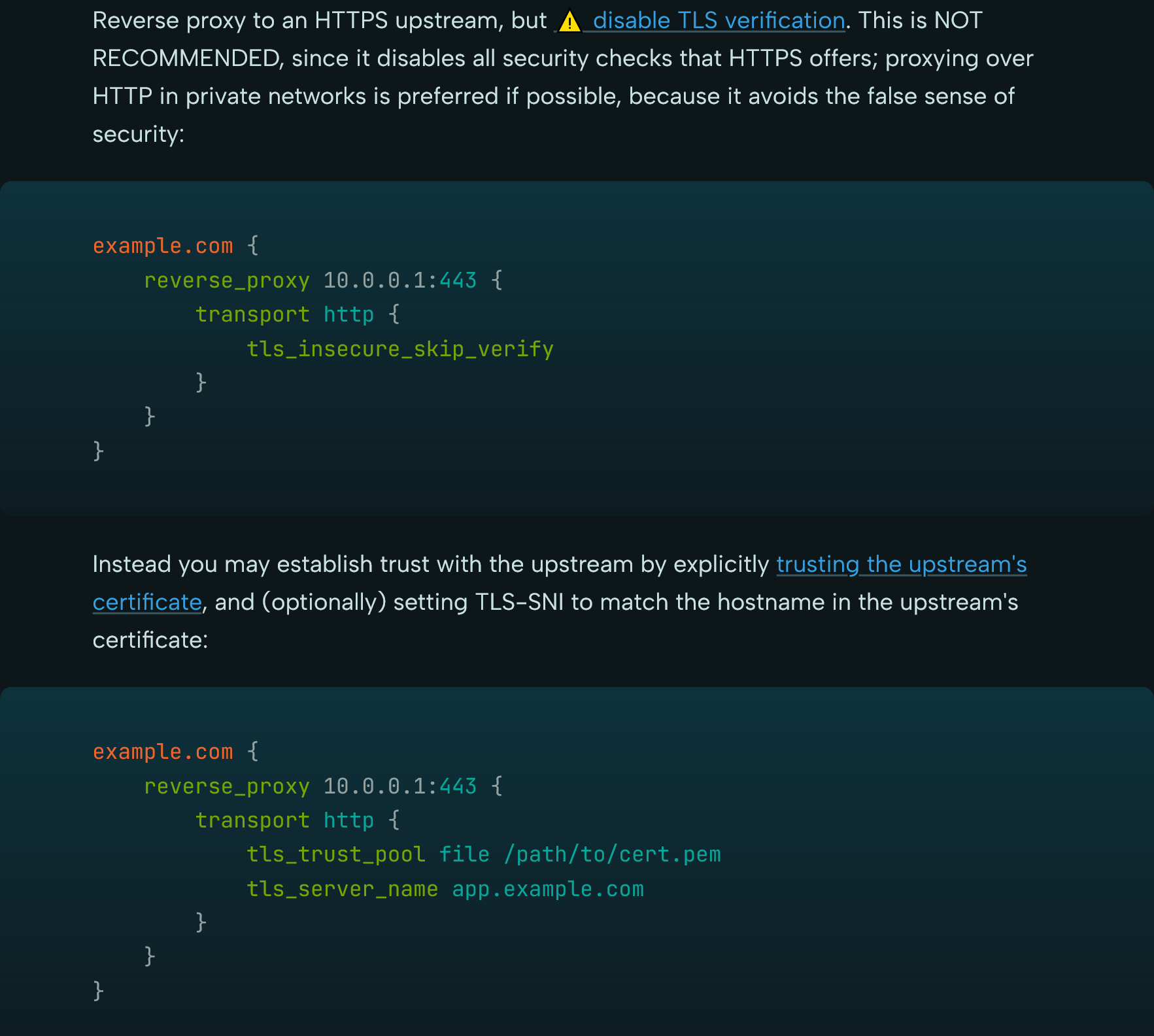
When I saw this option I had to remember my old caddy days where the explicitly warn about this and they have this instead:

(reverse_proxy (Caddyfile directive) — Caddy Documentation)

I assume that I can’t set a trust pool with Ferron as of now?

I also tried Manual TLS - Ferron 3 (RC) documentation now but then I can’t load the cert and key.

With reverse proxy custom “trust pools” it’s currently not supported, but it’s something I could consider to implement…